Category: Retro

  • Building the Wolfenstein 3D Engine

    Building the Wolfenstein 3D Engine

    As a designer, I of course have a desire to make games, but one of my stumbling blocks is programming. Since I never had any formal education in Computer Science (my degree was a Bachelor of Arts in Computer Games Design) this has always been a bit of a hurdle for me when trying to build my own games. But about nine years ago I started digging into how to do this, starting with GameMaker and its own language. I then moved on to Unity, using C#, then Unreal’s Blueprints system, and – more recently – C++ within Unreal. I’ve learned A LOT in that time, but I’ve increasingly felt that I needed a solid Computer Science foundation in order to fully understand some of the inner workings of games which will subsequently help me to program faster and more efficiently without bashing my head against a wall on problems that a lot of programmers will know the answers to quickly and easily. This became more apparent when I recently ran into a problem I’d experienced with Unreal’s AI Navigation system, which required me to delve into the source code, and – while I pretty much solved the issue – it still left me without a full grasp of how its underlying structures and syntax fitted together.

    Download the example here: https://pyman.itch.io/wolfenstein-3d-engine

    To that end, I embarked on finding quality learning, that aligned with my current level of knowledge but would push my understanding of low-level and foundational Computer Science further and found Gustavo Pezzi’s Wolfenstein Raycasting Course which starts with a JavaScript prototype, then moves into using C for the full implementation of the engine. Building a game from scratch, without an existing engine, is fairly daunting for a typical non-programmer like myself but id Software’s Wolfenstein 3D from 1992 is old enough and simple enough to understand more completely in its entirety even than something like Doom from the following year so it seemed like a good fit. Not too complex, and at my knowledge level, but also pushing me further. The course is mostly about the wall and world rendering, with a section on sprites, so there is no animation, AI, or other game logic within, but that’s fine. I was mostly fascinated with how the raw raycasting algorithm worked.

    The final implementation of the engine uses plain old C, the SDL library for basic window handling, and a PNG decoder to load texture data into memory and that’s it, no other libraries or engines used. It’s a pretty magical moment when you create something purely from mathematics that then becomes an entire world on screen.

    For anyone wondering how it works, the short answer is to pay attention to the minimap in the top left. The player camera is firing a number of rays equivalent to the pixel width of the screen (in this case 800 at a screen res of 800 x 450) within the field of view.

    Each ray uses some trigonometry, and good old linear algebra to determine if it’s hitting a grid section that’s a wall or not. If it is, it checks the distance to the wall and vertically scales that pixel column appropriately. It then renders each vertical pixel based on a texture id assigned to the wall and the cartesian coordinates of the texture’s colour data.

  • I made Pong

    I made Pong

    Play my version of Pong on itch.io here

    One of those old discussions about scope came up recently at work, so I was interested to see how long it would take to make something in as small a scope as possible.

    So I made Pong, you can play it via the link above. It probably still has a few bugs, but should be mostly stable. You can play it in a browser in either singleplayer or a couch multiplayer mode, side by side. It uses keyboard controls but should also support XBox and Playstation controllers

    It took me probably a couple of hours (if that even) to get a simple working version of it up and running. But I ended up taking it further, and over the next few evenings I coded in some pretty basic AI for a singleplayer mode, a menu to choose between the two, some audio, and fixed a load of bugs.

    Pong was an obvious candidate for a small scope game: the controls are simply up and down, and any modern engine (I used Unity) can handle the ball’s physics movement and collisions pretty easily. Creating a game as small as Pong is also a great exercise in experiencing the process of creating and releasing a full game. And is, as most game developers will already know (and are always eager to drill into students), eye opening in terms of what proportion of time is spent on developing the various aspects of an entire game.

    Bugs probably took up most of my time, which was mostly down to getting the ball’s physics to behave properly, and some UI issues with selection and click sounds. Aside from bugs, it was the extra features I decided to implement that took up the rest of the time. The AI for the singleplayer mode is pretty rudimentary and can still definitely be improved. Despite this it still took up a fair proportion of the time.

    AI Mechanics

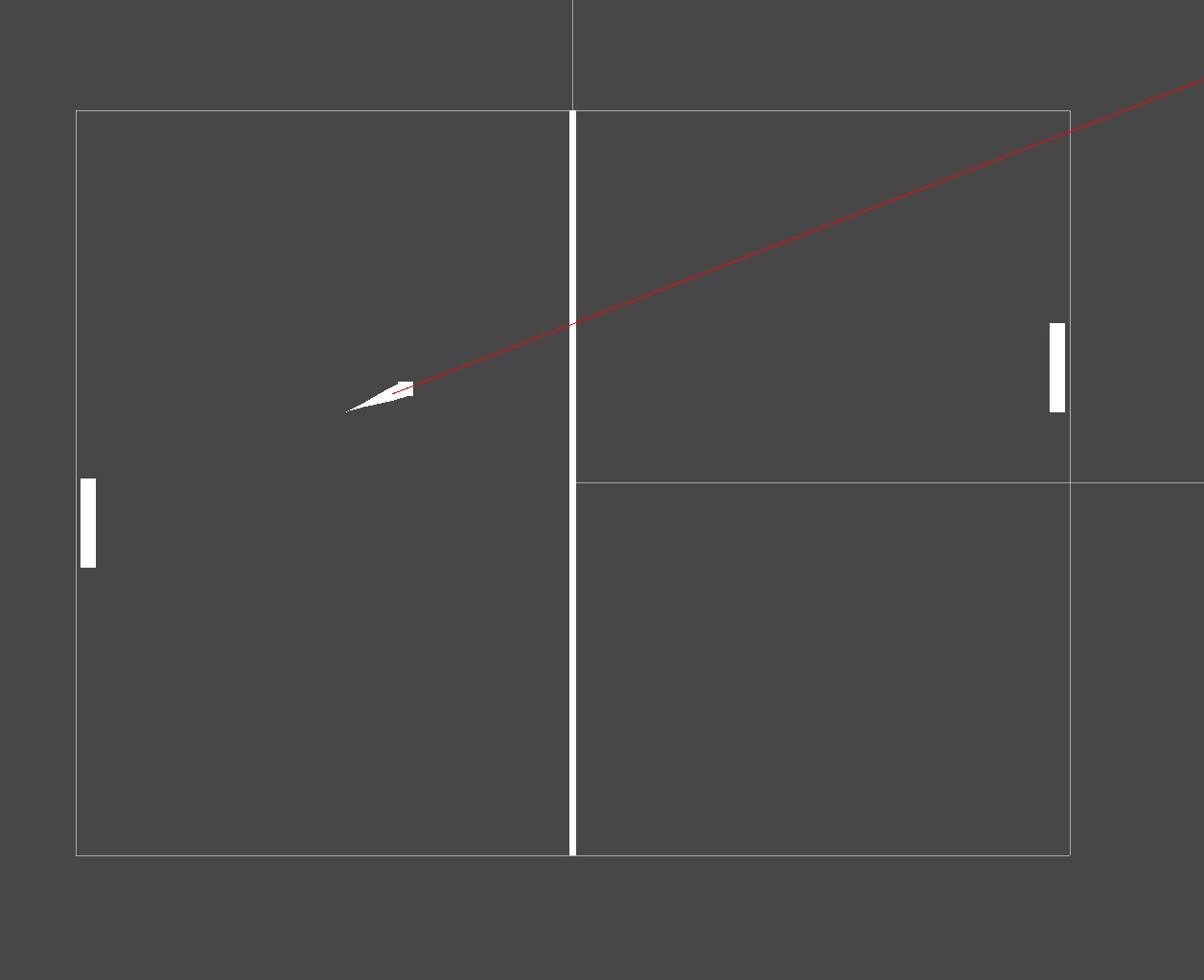
    The AI predicts the path of the ball by first checking if the ball is heading towards them. It then casts a ray from the ball’s position, along the ball’s forward direction, until the ray hits a point on the right edge of the screen. It takes the Y position of the point hit, then moves towards it (at the same speed a human player could for fairness) in order to block the ball. Obviously this would produce a perfect block every time, provided that the AI could reach the blocking point in time, so I introduced a random factor of error by adding or subtracting a random amount into the Y position to try and simulate a real player not quite guessing the path of the ball correctly. This process is then repeated after a short time (also randomised within a range) for correction as the ball is continuing to travel towards the AI.

    The ball is casting a ray in the direction of its travel. At this vector it will hit the top right corner, so the AI moves to intercept it.
    The main AI coroutine, it’s recursive, but the delay before it repeats again is set in the coroutine itself

    The AI could still do with some improvement. As of yet it does not correct itself for the ball’s position more accurately as the ball gets closer (just as a human player would), but this is pretty easy to fix. It also only tries to predict the ball’s final position when the ball is facing towards the right edge of the screen, it cannot predict the direction of the ball before a bounce from one of the top edges. This is trickier to fix as I have to calculate the ball’s direction vector after the bounce. It’s possible of course, but I’ll have to dig into some more physics maths.

    Extra Mechanics

    While Pong is a simple game, there are strategies and mechanics that permit more skilled play, and deepen its gameplay somewhat. By changing the direction of the ball depending on what part of the paddle it hit, we can add some player control to its velocity. In my version (and I think this is similar for the original) if the ball hits the very centre of the paddle it will move horizontally back across the screen. However, if the ball hits anywhere between the centre and the top edge of the paddle, its direction will be altered according to how far it is from the centre, up to a maximum angle of 45 degrees.

    So if the ball hits the very top edge of the paddle it will be fired upwards at a 45 degree angle. If it hits the bottom edge it will be fired downwards at 45 degrees. If it hit exactly between the centre and the top edge it would be fired upwards 22.5 degrees and so on.

    The mechanic also provides a nice risk/reward balance. Hitting the ball closer to the top or bottom edge of the paddle is harder to pull off and you risk losing the ball. However managing to do it, and hitting the ball off at an extreme angle, makes it harder for your opponent to catch.

    The ball has hit the top edge of my paddle, therefore it will direct itself at probably the maximum angle upwards (45 degrees)

    All in all, it’s a good exercise in creating and releasing a full game, and all the pitfalls and challenges that come with it. The basic (probably buggy) version took me an hour or two, but that version had no win conditions or anything that could define it as a complete game. Everything else took me a few more evenings to create, package, and release a full game. If anything it’s a reminder of that old maxim that the last 10 percent is 90 percent of the work.

    Now that it’s done though, I could still improve it more, but I might start making other classic games just to see what the process is, and there’s always something new to learn even from the smallest of titles.